


Mostly every desktop computer have multiple users and maybe every user of your computer have his own account in windows and their own password. But if a user of your computer loses his password then you can help him. I am saying that you can reset his account password so that he can make a new password. You can reset password of any account using this method.
Showing posts with label Windows. Show all posts
Showing posts with label Windows. Show all posts
Thursday, 27 December 2012

Friday, 21 December 2012
Why Antivirus and Firewalls are essential?
Posted by Edward
Viruses are all over Internet, I would like to say that Internet is full of viruses instead of files. If you get a file for free you’ll definitely get a virus with it. There are very small amount of websites that should be trusted. So if you are going to download software then don’t trust anyone, even me. Try to check files with antivirus to make sure that files are free of viruses.
Sunday, 16 December 2012
Change colors of CMD permanently with video tutorial
Posted by Edward
CMD is like old DOS OS and looks too much old. But you can do lot of work using this (delete files, copy files, change IP address, to format hard drive and for much more). You can customize it little bit. Means you can change colors of CMD using below codes:
color 1fand some other combinations. Color changing permanently or temporarily both are given in this article.
color 2f
color f2
Thursday, 13 December 2012
Change your Computer's IP (Internet Protocol) without restarting anything (with the help of CMD)
Posted by Edward
 When you visit a website your IP address is recorded. There are some websites that give you some services in very small amount. For example if you want to track someone's IP address, you visit a website that gives that services for free but you can only use that for given amount. Mostly 5 times you can use that service and after that they ask you to upgrade your account to get extra volume.
Monday, 10 December 2012
Backup files using Google Drive
Posted by Edward
 If you read my blog regularly then you may know that I've posted how to use Skydrive to make backup your files for free. As I mentioned in that post that I'll posted tutorial by which you can make backup of your files on Google Drive. So here is that tutorial ...

Friday, 30 November 2012
Backup your most used and important files to skydrive by hotmail
Posted by Edward
 We all have some personal and some important data on our PC. But sometimes we got some error in our operating system and then our operating system crashes. Then we have to install it again or we can fix problems but fixing some problems are not so easy. It is easy to install new OS then fixing problems. But when you reinstall your OS (windows) you'll lose some of your old data. Best way to keep your too much important data is to make backup of it. You can make a backup on a pen drive/USB drive or you can use online services to save your important files.
One of most trusted is SkyDrive by Hotmail. You can save your files on SkyDrive as backup and you can download those files from there at any time.

One of most trusted is SkyDrive by Hotmail. You can save your files on SkyDrive as backup and you can download those files from there at any time.
Saturday, 24 November 2012
Selling old PC could be harmful
Posted by Edward
 If you have old PC and you want to buy a new one and you also want to sell old one then you should know that if you sell your old PC it means your are selling your everything. Because most hackers try to buy used computers, mostly hard drives because it contains your personal information. It is known that sensitive data is present on PC in greater amount even if it is empty. Mostly all people sell their old PC without properly deleting sensitive data present on it. You may know you can get your deleted data back using recovery software.

Thursday, 22 November 2012
Change registry settings without restarting
Posted by Edward
 As you know when you change registry settings you have to restart Windows for changes to take effect. Because at that time Windows uses old settings and after restart new settings are used. So it means it is essential to restart your PC after changing any registry key.
Some may think why to change registry settings?

Some may think why to change registry settings?
Friday, 9 November 2012
How to shutdown PC automatically
Posted by Edward
As you know if we start scanning for viruses by antivirus then it can take several minutes to several hours to complete. But if someone have to go somewhere, mostly he turns his PC off without getting scan complete. There are also some other situations like this. I have seen many times most people let their PC working and go to their work and then their PC may keep running whole the day long.
If you are downloading something then mostly now in all downloaders this option is available that shuts down your pc after download is completed. But if you are doing such thing in which option like this is not available (like PC scan), then what will you do?
I have a solution for this problem.
If you are downloading something then mostly now in all downloaders this option is available that shuts down your pc after download is completed. But if you are doing such thing in which option like this is not available (like PC scan), then what will you do?
I have a solution for this problem.
Tuesday, 2 October 2012
Hide Any partition of a hard drive in Windows
Posted by Edward
If you want to hide a partition of a hard drive in Windows XP so that you can hide your personal things in that and when you need your things repeat process in reverse manner to get your hard drive partition back with your things. Process is simple and easy.
A DOS Windows will appear with following description
Result will look as shown in picture below
Steps to hide drive:
1. Go to start and click on run and type in diskpartA DOS Windows will appear with following description
DISKPART>2. Type in that list volume
Result will look as shown in picture below
Sunday, 23 September 2012
Speed up your internet by 20%
Posted by Edward
Sometimes we get in place where we get very less Internet speed that is not enough for our works. But you can increase Internet speed by 20%. Because Windows 2000 and onward reserve 20% of your available Internet bandwidth for some windows Updates and some other windows programs. You can cancel that reservation and can use that 20% bandwidth too.
Monday, 17 September 2012
Open Firefox in Firefox
Posted by Edward
You can open another Firefox browser inside current Firefox browser means you can open two browsers in same browser.
Copy below code and paste in address bar of Firefox and Press enter
Copy below code and paste in address bar of Firefox and Press enter
chrome://browser/content/browser.xul
Hide names of Files, Folders and other things
Posted by Edward
Can you make a file with no name?
If you cannot then look below.
- Right click on it and then click on rename
- Press and hold Alt key and press 0160
- Now press enter
All is done
If you cannot then look below.
Steps:
- Select that file whose name you want to remove- Right click on it and then click on rename
- Press and hold Alt key and press 0160
- Now press enter
All is done
Increase the trial of ESET NOD 32 Antivirus
Posted by Edward
We know ESET NOD 32 is among best antivirus software so that's why this is not free. This antivirus comes with a 30 day trial version and after this we have to buy ESET NOD 32 antivirus for our protection from viruses.
But you can register it using some fake keys etc. But after registering it using fake keys it'll stop updating its virus signature database. These database should update at-least once a day. So if virus signature database of it is not being updated then this antivirus has no advantage. Because new virus signature database are not present and antivirus don't detect any virus if virus is modern and virus signature database is old.
This antivirus is built for speed.
But you can register it using some fake keys etc. But after registering it using fake keys it'll stop updating its virus signature database. These database should update at-least once a day. So if virus signature database of it is not being updated then this antivirus has no advantage. Because new virus signature database are not present and antivirus don't detect any virus if virus is modern and virus signature database is old.
This antivirus is built for speed.
Solution:
We cannot use any other method for getting free security from ESET NOD 32 antivirus. So we can only get free security from ESET NOD 32 Antivirus by increasing its trial period.Thursday, 13 September 2012
Increase virtual memory to increase speed of ram and pc
Posted by Edward
When we open too much things together then some of the files that are on background are cached on hard drive making ram free for active programs and default space for savings that background files is less than a GB. But sometimes PC require more memory like this. You might have seen a message in Windows XP that pop up and says something like this
Your computer is on low virtual memory. Request for new programs may be reject during this time.You can increase your virtual ram if you are getting this warning message again and again. This also increase speed of RAM.
Sunday, 9 September 2012
How to change speed of fans inside a PC (CPU)
Posted by Edward
Two or three fans are fitted inside a PC. In most cases one or two. When you operate your PC it gets hot then these fans automatically increase their speed and remain at high speed unless PC is returned to its normal conditions of temperature. So main function of these fans is to make your PC cool by ejecting all of the hot air from it.
Sunday, 2 September 2012
Disable CD/DVD drive in windows
Posted by Edward
If you want to disable your CD/DVD drive in windows then you can look below for steps to follow.
If you want to disable your CD/DVD drive in windows then you can look below for steps to follow.
Open up device manager:
You can open device manager by three methods
Saturday, 1 September 2012
Keyboard character delay settings
Posted by Edward
When we press and hold a key it repeat itself after a little time and keep on repeating with a specified frequency (i.e 5 letters per second).
You can increase and decrease these 2 times.
You can increase and decrease these 2 times.
Change the delay before keyboard characters repeat:
- Open keyboard from control panel (click on start > control panel > hardware and sound > keyboard)
Friday, 31 August 2012
Create keyboard shortcut to eject and close CD/DVD drive
Posted by Edward
This post is going to tell you how to make shortcuts for ejecting and inserting CD/DVD into CD/DVD drive.
2. Start up the tooler and create shortcuts for ejecting and closing the cd/dvd drive on the desktop.
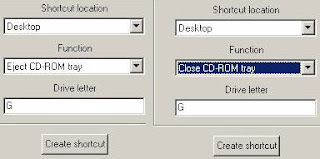
Steps:
1. First of all download a freeware software named as tooler. (DOWNLOAD)2. Start up the tooler and create shortcuts for ejecting and closing the cd/dvd drive on the desktop.
Wednesday, 29 August 2012
Delete files permanently without moving to recycle bin
Posted by Edward
When you delete something you can restore it from recycle bin. But this recycle bin uses Hard Disk Space for keeping files. If you want to delete files directly without moving them to recycle bin then follow some steps.
Subscribe to:
Posts (Atom)


